karpenter-optimizer
Karpenter Optimizer



💰 Cost optimization tool for Karpenter NodePools. Analyzes Kubernetes cluster usage and provides AI-powered recommendations to reduce AWS EC2 costs while maintaining performance.
Karpenter Optimizer helps you optimize your Karpenter NodePool configurations by analyzing actual cluster usage and providing intelligent, cost-effective instance type recommendations. Get visual before/after comparisons showing cost and resource savings.
✨ Features
- 🎯 Automatic Workload Discovery: Automatically fetch workloads from your Kubernetes cluster
- 📊 Real-time Node Usage: Visualize actual CPU and memory usage per node with interactive charts
- 🏗️ NodePool Analysis: Analyze existing Karpenter NodePool configurations for accurate before/after comparisons
- 💡 AI-Powered Recommendations: Get intelligent NodePool recommendations optimized for cost and performance using Ollama
- 💰 AWS Pricing Integration: Real-time pricing from AWS Pricing API for accurate cost calculations
- 🔄 Spot vs On-Demand Optimization: Automatically recommends optimal capacity types (spot/on-demand)
- 📈 Cost Savings Analysis: Detailed cost breakdown showing potential savings per NodePool and cluster-wide
- 🖥️ Modern Web UI: React-based interface with real-time updates and progress tracking
- 🚨 Disruption Tracking: Monitor Karpenter node disruptions and identify blocked deletions
- 📦 Helm Chart: Production-ready Helm chart for easy Kubernetes deployment
- ⚡ Kubernetes Native: Uses Kubernetes API directly - no Prometheus required
📸 Screenshots
Cluster Overview
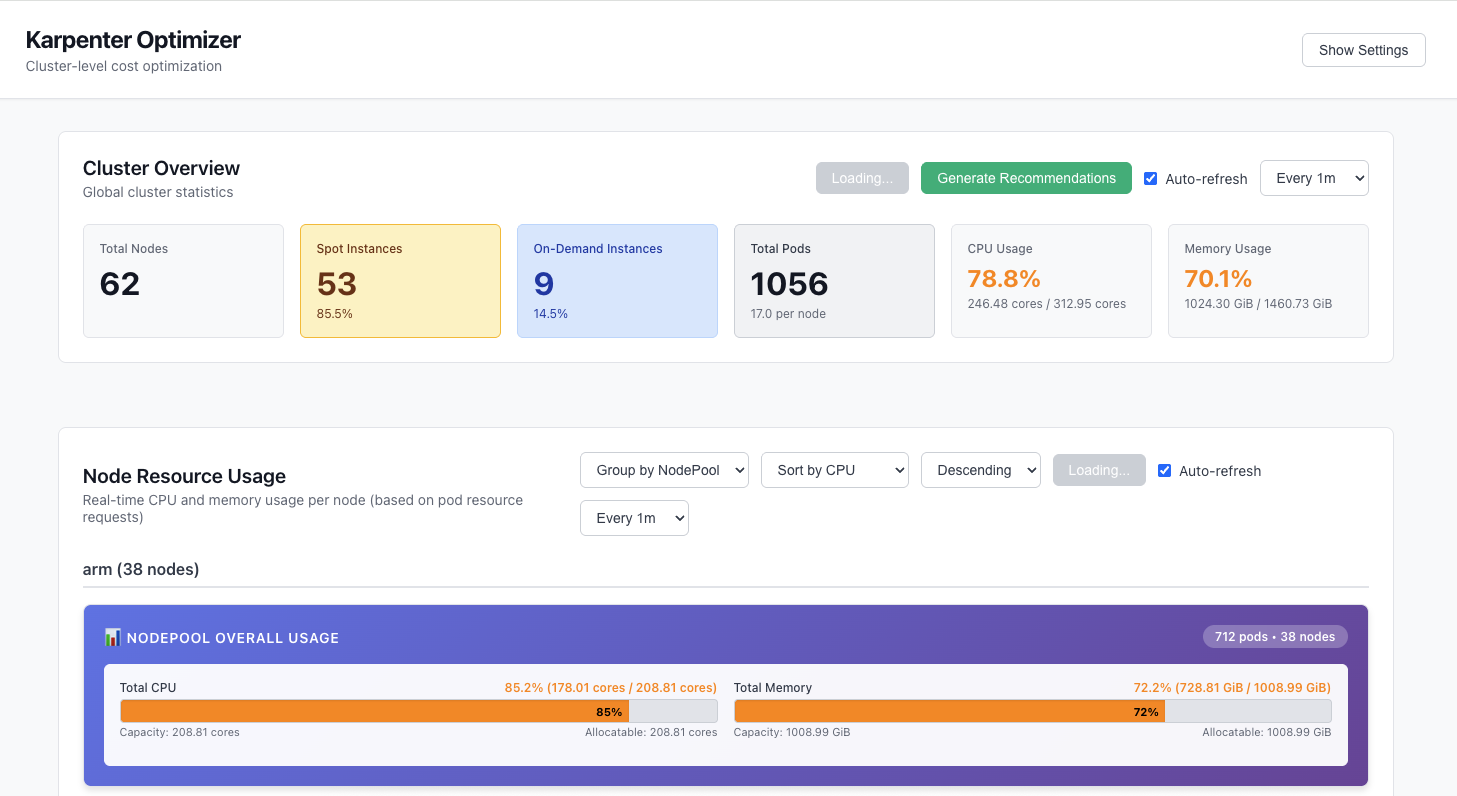 View cluster-wide statistics and generate recommendations
Cost Savings Analysis
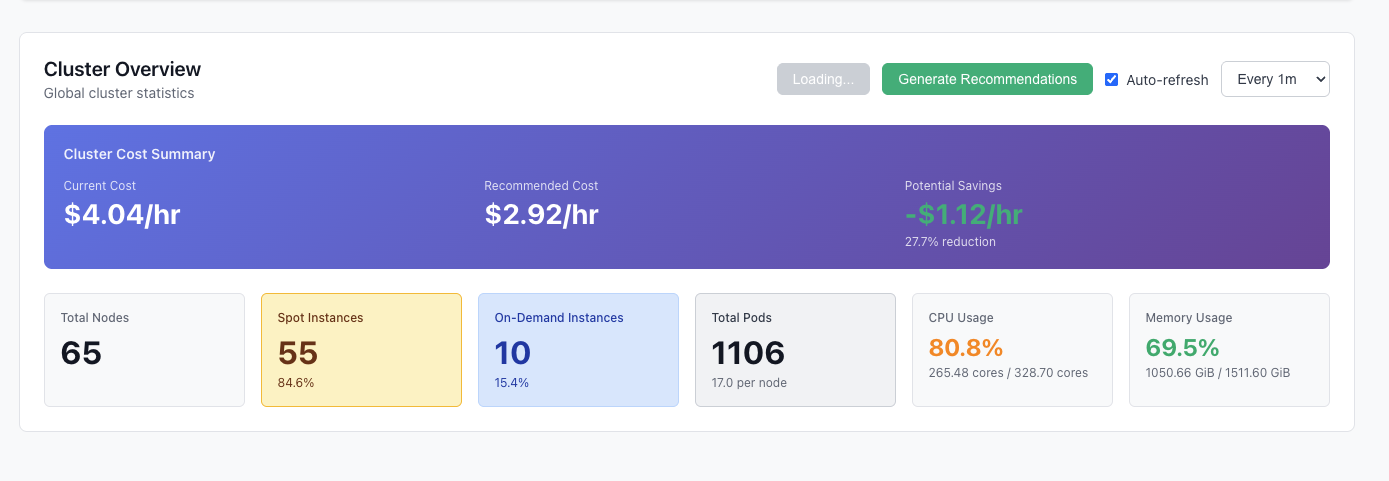 See potential cost savings across your entire cluster
NodePool Recommendations
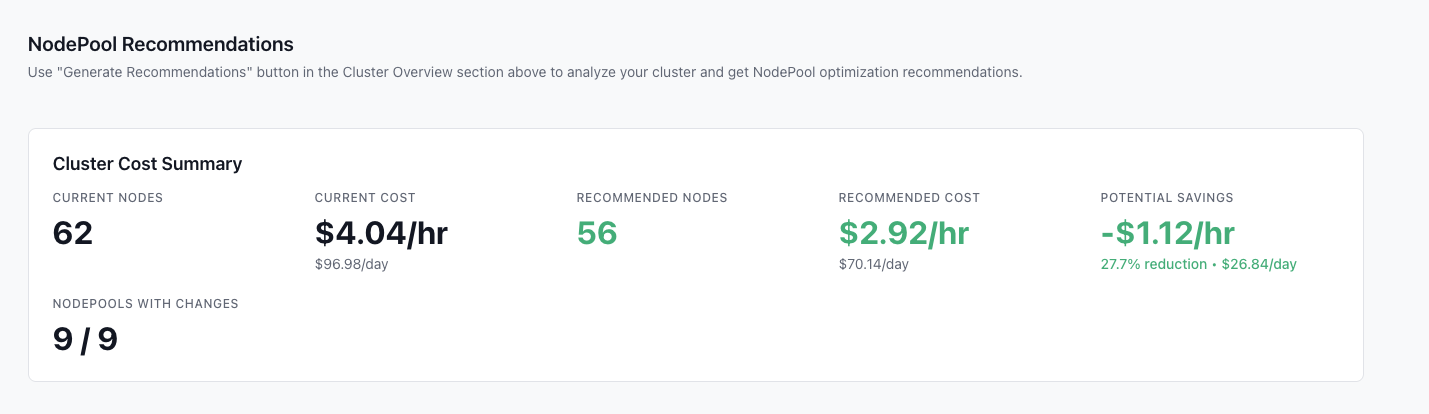 Detailed NodePool recommendations with before/after comparisons
AI-Powered Explanations
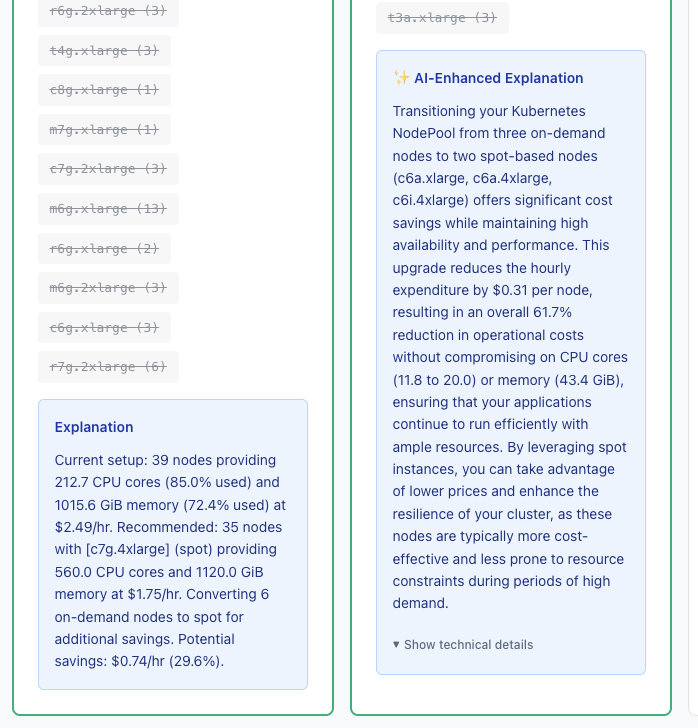 Get intelligent explanations for each recommendation
Node Usage Visualization
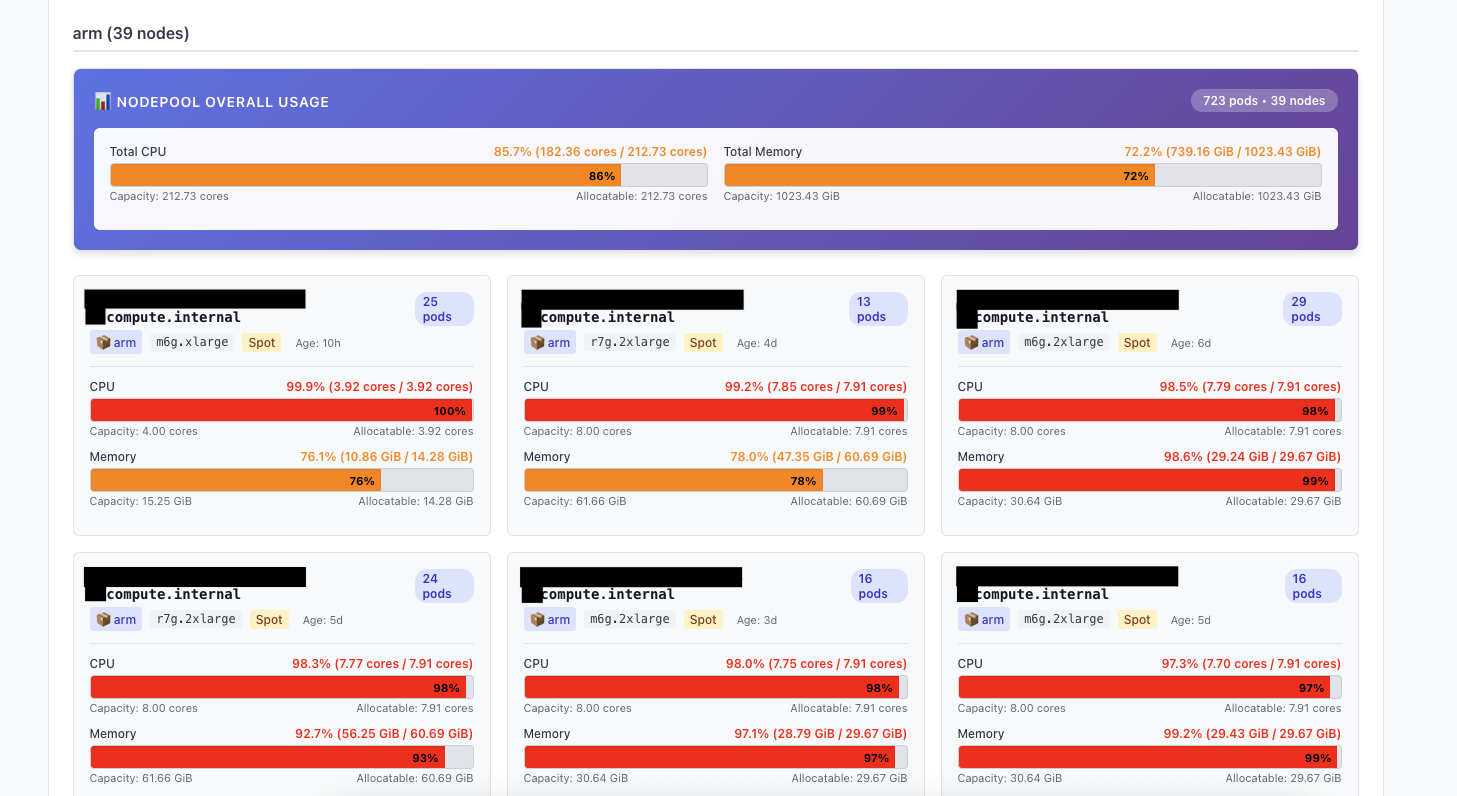 Real-time visualization of CPU and memory usage per node
Node Disruption Tracking
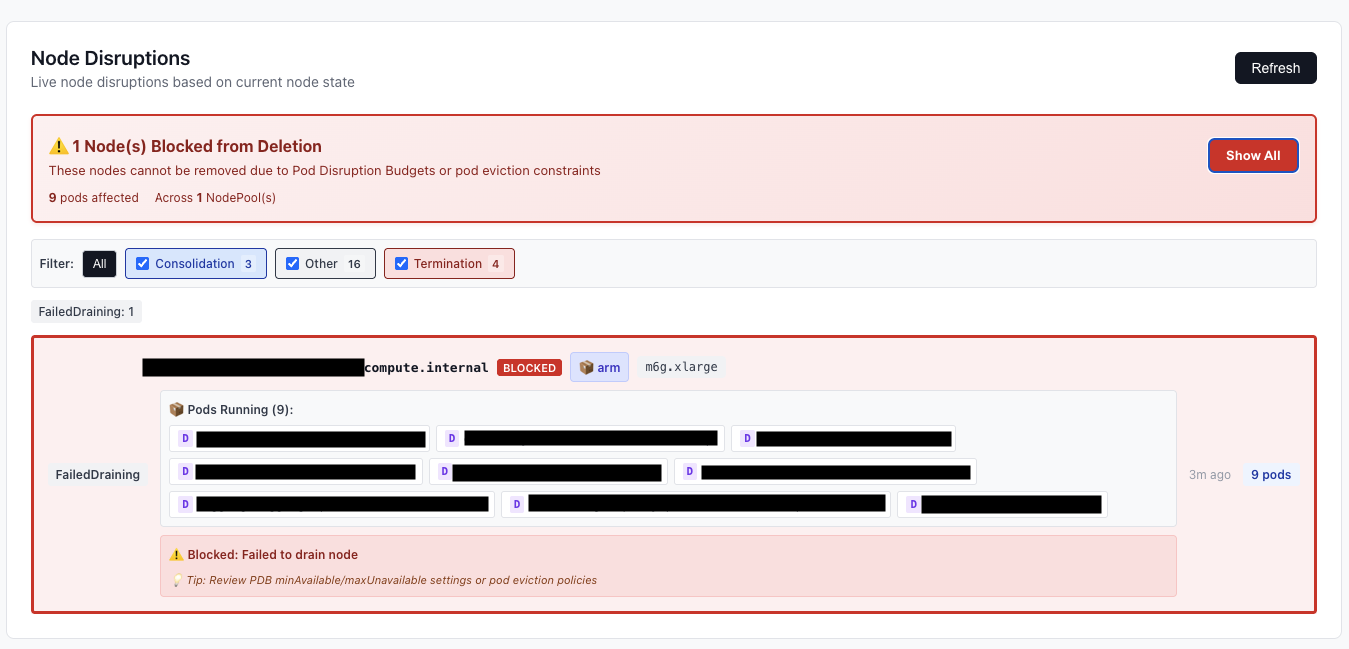 Monitor Karpenter node disruptions and identify blocked deletions
Settings & Configuration
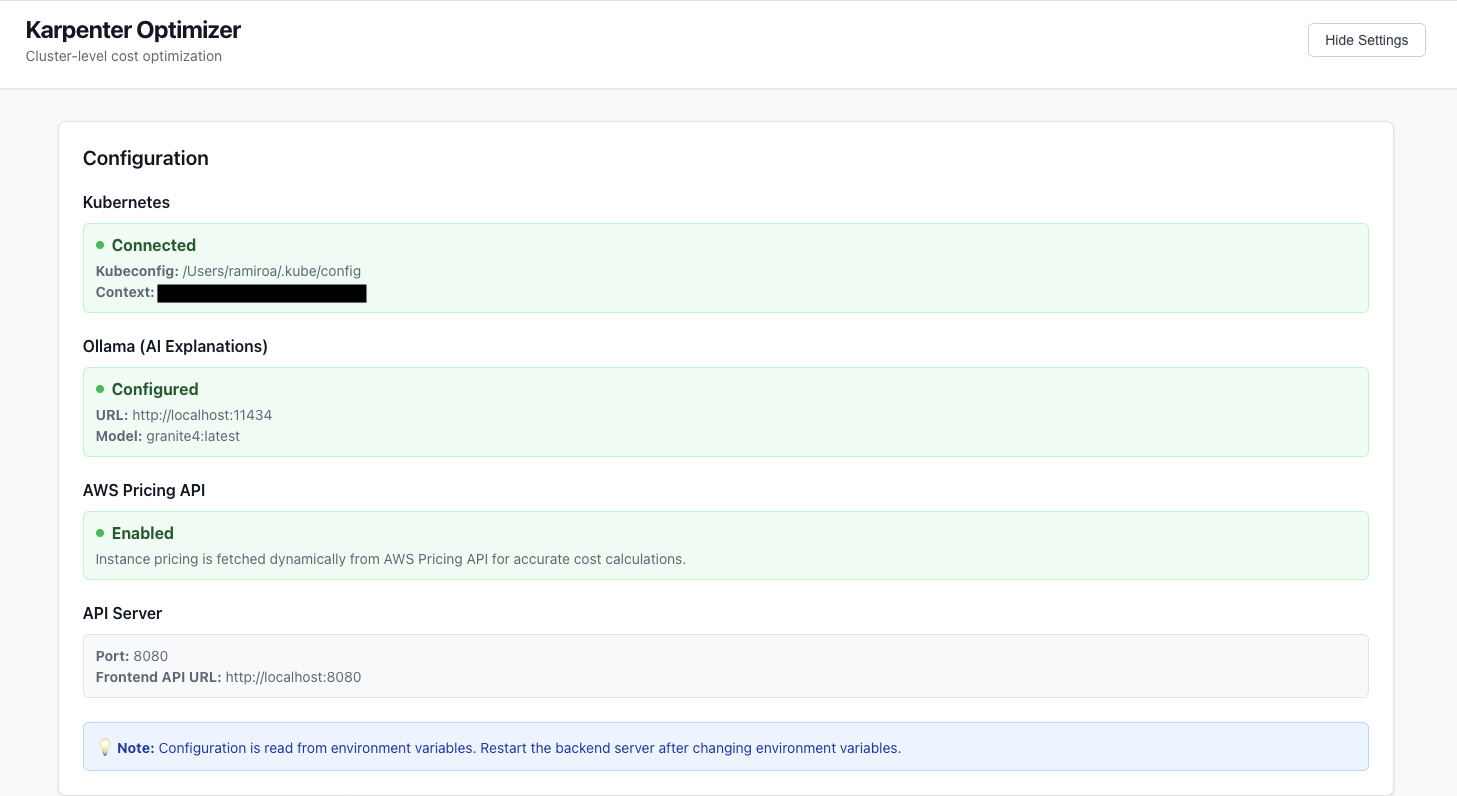 Configure Kubernetes, Ollama, and AWS Pricing API settings
Architecture
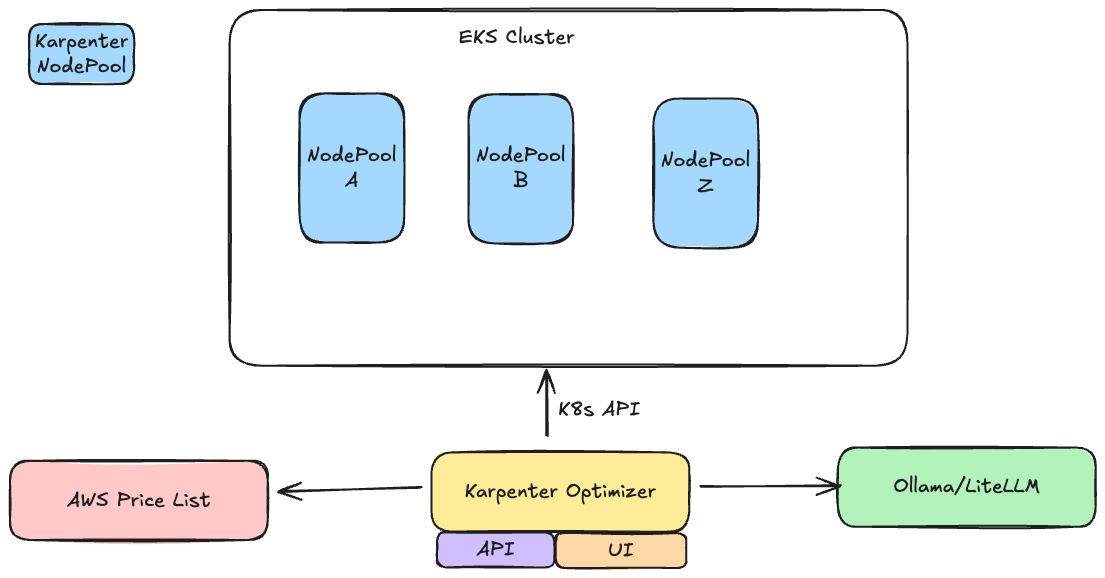
Karpenter Optimizer follows a modern microservices architecture:
- Backend: Go-based REST API server with Kubernetes integration
- Frontend: React web application with interactive charts and visualizations
For detailed architecture documentation, see docs/architecture.md.
🗺️ Roadmap
We’re actively working on improving Karpenter Optimizer. Here’s what’s coming next:
- Multi-cluster Support - Manage and compare recommendations across multiple Kubernetes clusters
- Enchanced filtering - Filter recommendations by cost savings, instance types and capacity types
- Export Recommendations - Export recommendations as YAML manifests for easy application
- Performance Improvements - Optimize API response times for large clusters
- Historical Cost Tracking - Track cost trends over time and measure actual savings
- Machine Learning Predictions - ML-based workload prediction and proactive optimization
- Cost Allocation - Show costs by namespace, team, or label for better chargeback
- Scheduled Recommendations - Automated daily/weekly optimization reports via email or Slack, Discord…
- Policy Engine - Define optimization policies and constraints (e.g., never use spot for production)
Community-Driven
We welcome community input! If you have ideas or feature requests, please:
- Open an issue on GitHub
- Join our Discussions
- Contribute via pull requests
🚀 Quick Start
Prerequisites
- Kubernetes cluster with Karpenter installed
- kubectl configured with cluster access
- (Optional) Ollama instance for AI-powered explanations
- (Optional) IRSA (IAM Roles for Service Accounts) configured for EKS clusters (recommended)
Quick Install
Using Helm (Recommended)
helm repo add karpenter-optimizer https://kaskol10.github.io/karpenter-optimizer
helm repo update
helm install karpenter-optimizer karpenter-optimizer/karpenter-optimizer \
  --namespace karpenter-optimizer \
  --create-namespace
See the Helm chart documentation for detailed configuration options.
Using Docker
docker run -d \
  --name karpenter-optimizer \
  -p 8080:8080 \
  -v ~/.kube/config:/root/.kube/config:ro \
  ghcr.io/kaskol10/karpenter-optimizer:latest
Local Development
Backend:
# Install dependencies
go mod download

# Run the API server
go run ./cmd/api
Frontend:
cd frontend
npm install
npm start
The API will be available at http://localhost:8080 and the frontend at http://localhost:3000
Environment Variables:
KUBECONFIG: Path to kubeconfig file (default:~/.kube/config)KUBE_CONTEXT: Kubernetes context to use (optional)PORT: Port for the API server (default: 8080)OLLAMA_URL: URL to Ollama instance for AI explanations (optional)OLLAMA_MODEL: Ollama model to use (default:granite4:latest)
📖 Documentation
- Quick Start Guide - Get started in minutes
- Deployment Guide - Detailed deployment instructions
- IRSA Setup Guide - Configure IAM Roles for Service Accounts (EKS)
- Architecture Documentation - System architecture details
- API Reference - Complete API documentation
- Contributing Guide - How to contribute
- Security Policy - Security reporting
- Adopters - Organizations using Karpenter Optimizer
- Helm Chart Docs - Helm installation guide
Example Workload JSON
[
  {
    "name": "web-app",
    "namespace": "default",
    "cpu": "500m",
    "memory": "512Mi",
    "gpu": 0,
    "labels": {}
  },
  {
    "name": "ml-training",
    "namespace": "ml",
    "cpu": "4",
    "memory": "16Gi",
    "gpu": 1,
    "labels": {
      "karpenter.sh/capacity-type": "on-demand"
    }
  }
]
API Endpoints
Interactive API Documentation
Swagger UI: Access interactive API documentation at /swagger/index.html.
Local Development:
# Start the API server
go run ./cmd/api

# Access Swagger UI at:
# http://localhost:8080/api/swagger/index.html
Via Ingress (Production): When deployed with ingress enabled:
- Frontend:
https://your-ingress-host/(root path) - Backend API:
https://your-ingress-host/api/*(all API endpoints) - Swagger UI:
https://your-ingress-host/api/swagger/index.html
The ingress routes:
/→ Frontend container (port 80)/api/*→ Backend container (port 8080)
Dynamic Host Detection:
Swagger automatically detects the request host and scheme (http/https) from ingress headers (X-Forwarded-Host, X-Forwarded-Proto), so API calls from Swagger UI will work correctly whether accessed directly or through ingress.
Generate Swagger Documentation
# Generate Swagger docs (requires swag CLI: go install github.com/swaggo/swag/cmd/swag@latest)
make swagger
Core Endpoints
GET /api/v1/health- Health check endpointGET /api/v1/config- Get API configurationPOST /api/v1/analyze- Analyze workloads and get recommendationsGET /api/v1/recommendations- Get NodePool recommendations based on cluster usagePOST /api/v1/recommendations- Generate recommendations (alias for GET)GET /api/v1/recommendations/cluster-summary- Get recommendations with AI explanationsGET /api/v1/recommendations/cluster-summary/stream- Get recommendations with SSE progress updatesGET /api/v1/namespaces- List all Kubernetes namespacesGET /api/v1/workloads?namespace=<namespace>- List workloads in a namespaceGET /api/v1/workloads/:namespace/:name- Get specific workload detailsGET /api/v1/nodepools- List all Karpenter NodePoolsGET /api/v1/nodepools/:name- Get specific NodePool detailsGET /api/v1/nodepools/recommendations- Get NodePool recommendationsGET /api/v1/nodes- Get nodes with usage dataGET /api/v1/cluster/summary- Get cluster-wide statisticsGET /api/v1/disruptions- Get node disruption informationGET /api/v1/disruptions/recent- Get recent node deletions
For complete API documentation with request/response schemas, see the Swagger UI or generate the docs with make swagger.
Recommendation Output
Each recommendation includes:
- Name: Nodepool name
- Instance Types: Recommended EC2 instance types
- Capacity Type: Spot or on-demand
- Architecture: amd64 or arm64
- Size Range: Min and max node count
- Resource Requirements: CPU and memory ranges based on actual pod resource requests
- Estimated Cost: Hourly cost estimate
- Current State: Actual NodePool configuration (if found in cluster)
- Reasoning: Explanation of the recommendation
- Matched Workloads: Workloads that match this nodepool
Visual Comparison Features
The frontend provides comprehensive before/after comparisons:
- Cost Comparison: Current vs recommended costs with savings percentage
- Node Comparison: Current vs recommended node counts with reduction metrics
- Annual Savings: Projected annual cost savings
- Per-Nodepool Breakdown: Detailed charts showing cost and node differences for each nodepool
- Interactive Charts: Bar charts and visualizations using Recharts
Kubernetes Native Approach
Karpenter Optimizer uses the Kubernetes API directly to analyze your cluster:
- Node Usage Calculation: Calculates CPU and memory usage from scheduled pods
- Real-time Data: Uses current cluster state - no external metrics required
- Accurate Recommendations: Bases recommendations on actual resource allocations and node capacity
How It Works
- Reads pod resource requests directly from Kubernetes API
- Calculates node usage by summing pod requests on each node
- Analyzes NodePool configurations and actual node instances
- Provides recommendations based on actual capacity vs usage
Kubernetes Integration
NodePool Analysis
The tool fetches existing Karpenter NodePool configurations:
- Automatic Discovery: Lists all NodePools in your cluster
- Configuration Parsing: Extracts instance types, capacity types, limits, and requirements
- Before/After Comparison: Uses actual NodePool configs as the “before” state
- Cost Calculation: Estimates costs based on actual instance types
Development
Project Structure
.
├── cmd/
│   ├── api/            # Backend API server
│   │   └── main.go
│   └── cli/            # CLI tool
│       └── main.go
├── internal/
│   ├── api/            # HTTP handlers
│   ├── config/         # Configuration
│   ├── kubernetes/     # Kubernetes client
│   └── recommender/    # Recommendation logic
├── frontend/           # React frontend
│   ├── src/
│   │   ├── components/
│   │   │   ├── ComparisonView.js
│   │   │   ├── RecommendationCard.js
│   │   │   ├── WorkloadForm.js
│   │   │   └── WorkloadSelector.js
│   │   └── App.js
│   └── package.json
├── examples/           # Example files
│   └── workloads.json
└── go.mod
Building
# Build backend
go build -o bin/karpenter-optimizer-api ./cmd/api

# Build CLI
go build -o bin/karpenter-optimizer ./cmd/cli

# Build frontend
cd frontend
npm run build
Docker Deployment
# Build and run with docker-compose
docker-compose up --build

# Or build individually
docker build -t karpenter-optimizer-api .
docker build -t karpenter-optimizer-frontend ./frontend
Usage Examples
Example 1: Analyze Workloads from Cluster
- Start the backend with Kubernetes access:
KUBECONFIG=~/.kube/config go run ./cmd/api -
Open the frontend at
http://localhost:3000 -
Select a namespace from the dropdown
-
Check workloads to add them
- Click “Analyze Workloads” to get recommendations
Example 2: Analyze Cluster Usage
- Start backend with Kubernetes access:
KUBECONFIG=~/.kube/config go run ./cmd/api -
The recommendations automatically analyze actual pod resource requests and node usage
- View the comparison charts showing current vs recommended costs
Example 3: Compare with Existing NodePools
- Ensure Kubernetes access is configured
- The tool automatically fetches existing NodePool configurations
- Recommendations show “before” (actual NodePools) vs “after” (recommended)
- View detailed cost and node count comparisons
🏗️ Architecture
Karpenter Optimizer is built with a modern microservices architecture:
- Backend: Go-based REST API server with Kubernetes integration
- Frontend: React web application with interactive charts and visualizations
- CLI: Go CLI tool for command-line usage and CI/CD integration
- Helm Chart: Production-ready Kubernetes deployment
For detailed architecture documentation, see docs/architecture.md.
🔌 API Endpoints
Core Endpoints
GET /api/v1/health- Health checkGET /api/v1/cluster/summary- Cluster-wide statisticsGET /api/v1/nodepools- List all NodePoolsGET /api/v1/nodepools/recommendations- Get NodePool recommendationsGET /api/v1/recommendations/cluster-summary- Get cluster-wide recommendations with AI explanationsGET /api/v1/nodes- List nodes with usage dataGET /api/v1/disruptions- Get node disruption information
See the Swagger UI for complete interactive API documentation with request/response schemas, or generate the docs with make swagger.
🤝 Contributing
We welcome contributions! Please see our Contributing Guide for details.
🌟 Adopters
See ADOPTERS.md for a list of organizations using Karpenter Optimizer. If you’re using it, please add your organization via pull request!
📄 License
This project is licensed under the Apache License 2.0 - see the LICENSE file for details.
🔒 Security
For security vulnerabilities, please see SECURITY.md.
🙏 Acknowledgments
- Built for the Karpenter community
- Inspired by the need for better cost optimization in Kubernetes
- Powered by AWS Pricing API and Ollama
Made with ❤️ for the Kubernetes community